SEO · 7 min read
What is a sitemap, and how to create one for your website (free)
Why an XML sitemap helps search engines find your pages, when you need one, and how to create, upload and submit one in a few minutes, with a free generator.
By the StaTrak team ·
Search engines find your pages mostly by following links. A sitemap gives them a shortcut: one file that lists every page you want in search results, so new and hard-to-reach pages don't get missed. It takes a few minutes to set up, and you only need to do it once per website. Here's what a sitemap is, when it matters, and how to make one.
What is a sitemap?
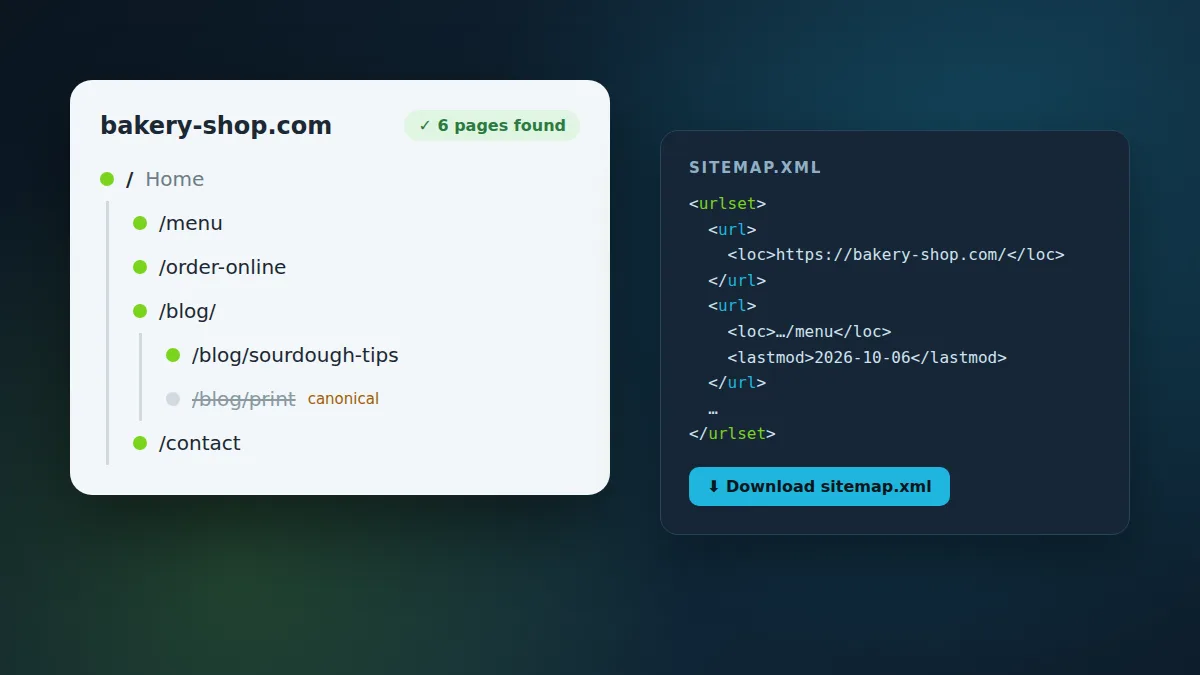
An XML sitemap is a plain text file, usually at yourdomain.com/sitemap.xml, that lists the addresses of your pages. Each entry can also say when the page last changed. Google, Bing and other search engines all read the same format, defined at sitemaps.org.
<?xml version="1.0" encoding="UTF-8"?>
<urlset xmlns="http://www.sitemaps.org/schemas/sitemap/0.9">
  <url>
    <loc>https://example.com/</loc>
  </url>
  <url>
    <loc>https://example.com/pricing</loc>
    <lastmod>2026-10-06</lastmod>
  </url>
</urlset>Don't confuse it with an HTML sitemap, a page for people that links to every section of a site. Both can be useful, but search engines want the XML one.
Why sitemaps matter
- New pages get found sooner. Instead of waiting for a crawler to stumble on a link, search engines see the page in your sitemap the next time they read it.
- Deep and poorly linked pages get found at all. A product five clicks from your homepage, or a blog post nothing links to yet, is easy for a crawler to miss.
- Changes get noticed. The lastmod date tells search engines which pages changed, so they can crawl those again first.
- New websites benefit most. With few links from other sites, a new website has fewer ways to be discovered, and a sitemap fills the gap.
- You see what's indexed. After you submit a sitemap, Google Search Console reports how many of its pages are indexed and why others aren't.
Do you need one?
Many websites already have one without knowing it. WordPress (since version 5.5), Shopify, Wix, Squarespace, Webflow and most SEO plugins create and update a sitemap automatically. Check yourdomain.com/sitemap.xml and yourdomain.com/robots.txt: if either lists a sitemap, you're set. Our generator checks both for you and tells you what it finds.
You do need to make one when your site is hand-built or static (plain HTML, a static site generator without a sitemap plugin, a custom app), when the existing sitemap is missing pages or lists old ones, or when you've moved to a new domain.
How to create a sitemap
- Open the StaTrak sitemap generator and enter your domain, like example.com.
- Wait while it crawls. It starts at your homepage and follows the links on your pages, respecting robots.txt, like a search engine would.
- Check the list of pages it found. Pages marked noindex, duplicates that point to a canonical page, addresses with query strings, broken links and files like images are left out on purpose.
- Download sitemap.xml.
If an important page is missing, it usually means nothing links to it. Add a link from your menu, footer or a related page, then generate the sitemap again. That fixes it for search engines too.
How to upload and submit it
- Upload sitemap.xml to your website's root folder, next to your homepage, so it opens at https://yourdomain.com/sitemap.xml. Use your host's file manager or FTP, or put it in your project's public folder.
- Add one line to your robots.txt file: Sitemap: https://yourdomain.com/sitemap.xml. Every search engine reads robots.txt, so this is how they all find your sitemap.
- In Google Search Console, open your property, choose Sitemaps, enter sitemap.xml and press Submit. Do the same in Bing Webmaster Tools, which also feeds other search engines.
- Come back after a few days to see how many pages are indexed.
# robots.txt
User-agent: *
Allow: /

Sitemap: https://yourdomain.com/sitemap.xmlSitemap best practices
- List only pages you want in search results: no login pages, thank-you pages, internal search results or duplicates.
- Use the final address of each page, with the same https and www (or no www) as your site, and no redirects.
- Only give a lastmod date when you know it. A date that changes every day for every page teaches search engines to ignore it.
- Keep each file under 50,000 addresses and 50 MB. Bigger sites split their pages across several sitemaps and list them in a sitemap index.
- Update it when you add, remove or rename pages. If your site changes often, use a plugin or build step that does it automatically.
Check that it worked
Open yourdomain.com/sitemap.xml in your browser: you should see the list of addresses. In Search Console, the Sitemaps report shows the status (Success) and how many pages it found, and the Pages report shows which are indexed. Then watch the visits arrive: StaTrak shows which pages people land on from Google and other search engines, without cookies.